

Thank you for being a volunteer. We appreciate the time and effort you give.
If you’re having trouble signing in to your VolunteerHub account, the solution is often straightforward. This guide will help you understand what might be happening and what to do next. By the end of this article, you will be able to:
- Troubleshoot common sign-in issues
- Understand why you may be having trouble accessing your account
- Identify who to contact if you need additional help
- Search your inbox for the original sign-up or confirmation email you received, or
- Visit the volunteer page on the organization’s website
There’s No Universal VolunteerHub Login Page
One important thing to know is that VolunteerHub doesn’t use a single universal login page. Each organization that uses VolunteerHub has its own unique sign-in page.
Because of this, googling “VolunteerHub login” or navigating to our marketing site homepage (volunteerhub.com) won’t take you directly to your account.
The quickest way to sign in is to:
- Search your inbox for the original sign-up or confirmation email you received, or
- Visit the volunteer page on the organization’s website
If you’re not sure where to go, reaching out to the organization you volunteer with will help you get the correct link.
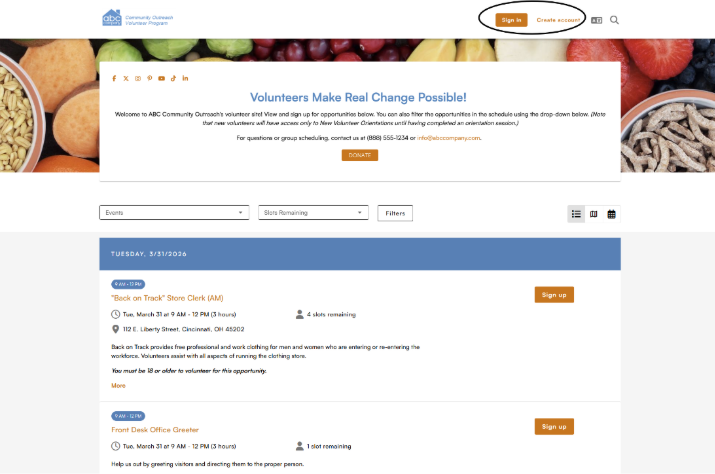
Here’s an example of where to find the login or account creation options on an organization’s volunteer opportunities page.
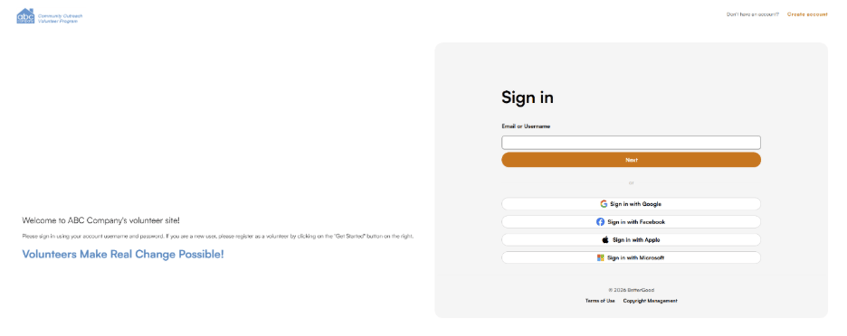
After clicking the sign-in link, you will be prompted to enter your information on a page that looks similar to the one below.
If you’re having trouble finding the volunteer landing page for the organization you volunteer with, please contact them directly for the correct link and help accessing your account.
Can’t Find the Organization You’re Volunteering With?
If you’re trying to locate an organization’s volunteer page, try the following:
- Search online: Look up the organization’s name with terms like “volunteer” or “VolunteerHub,” or check your email for past registration or confirmation messages.
- Contact the organization: Visit their website and use the “About” or “Contact Us” page, or check the footer for contact details.
- Check social media: Organizations often share volunteer links on platforms like Facebook, Instagram, or LinkedIn.
- Use familiar details: Think about the organization’s name, logo, or location to help confirm you’ve found the right page.
Forgot Your Account Password?
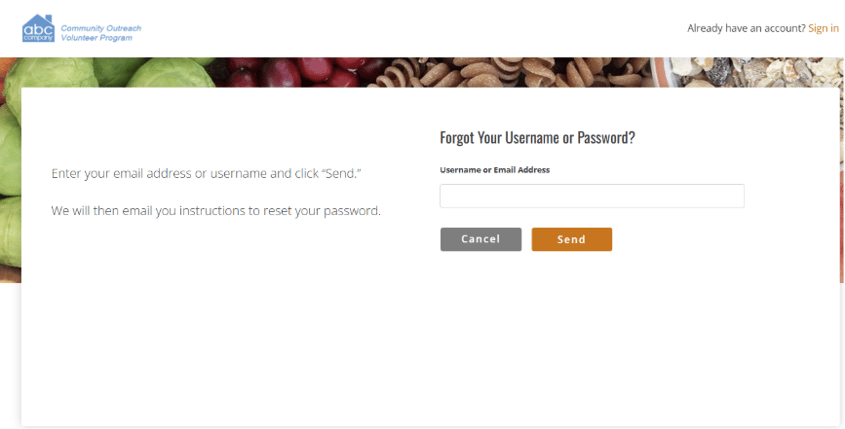
If you’ve reached the correct login page for the organization you volunteer with but can’t remember your password, select the “Forgot Password” link after entering your email address or username. You’ll then receive an email with instructions to access your account or reset your password.
If you don’t see the email, check your spam or junk folder. If it still hasn’t arrived after a few minutes, confirm you entered the correct email address and try again. If you continue to have trouble, contact the organization you volunteer with for further assistance.
Were You Invited to Volunteer?
If you were invited to volunteer rather than signing up yourself, your account setup may still need to be completed. Look for an invitation or activation email from the organization and follow the steps provided.
If you can’t locate that email, the organization can resend it.
When You Need Additional Help
The organization you’re volunteering with is your best point of contact for account support. They can:
- Confirm whether your account exists
- Reset your password
- Resend setup or invitation emails
- Share the correct login link
Because each organization manages its own volunteer accounts, they’re the only ones who can access and update your specific information.
The Bottom Line
Sign-in issues are often related to using the correct login link or resetting a password. If those steps don’t resolve the issue, the organization you volunteer with can help you get back into your account.