

Year-end reporting adds another responsibility to your work as a volunteer coordinator: turning attendance records, volunteer hours, and program activity into reliable information for leadership, funders, and volunteers. When those records are spread across spreadsheets, sign-in sheets, and scheduling systems, reconciling the numbers can become a project of its own.
A useful year-end volunteer report does more than total hours served. It shows who participated, where volunteers contributed their time, and how their work supported your programs. It also helps you identify returning volunteers, shifts that remained difficult to fill, and gaps in the information you need for planning.
The reporting process does not need to become more complex to become more useful. Start with a consistent set of volunteer management metrics, verify the records behind each total, and document how you calculated the results. That gives you a reliable foundation to adapt for board updates, funder requirements, and volunteer recognition without rebuilding the report for each audience.
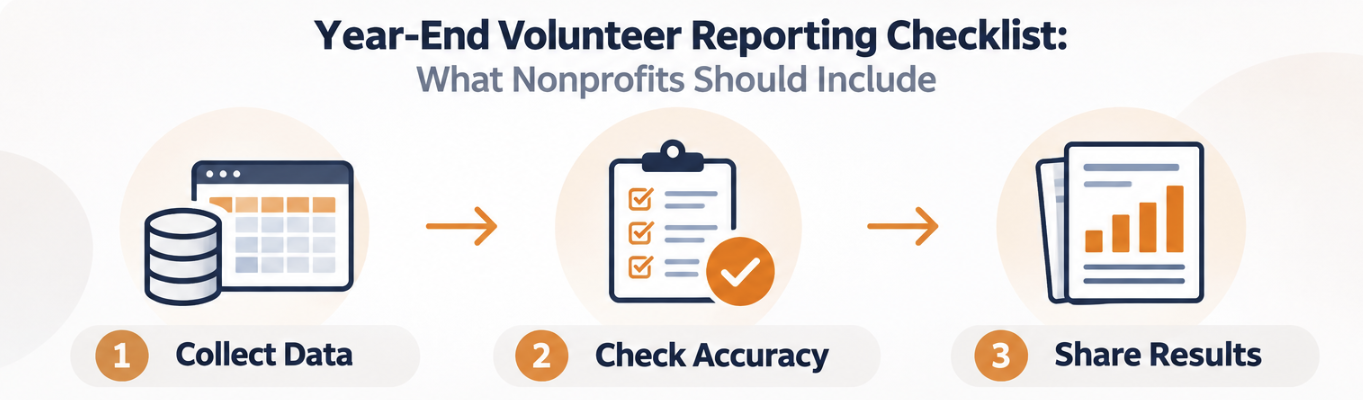
Use this checklist to organize seven essential volunteer metrics, review your data for accuracy, and present findings that support decisions for the year ahead.
Establish a Consistent Reporting Period
Before pulling volunteer records, define the start and end dates your report will cover. Use the calendar year, January 1 through December 31, or your organization’s fiscal year, depending on your reporting requirements.
Apply that timeframe to every metric. If volunteer hours reflect the fiscal year but active volunteer counts reflect the calendar year, the totals describe different periods of activity. That mismatch can lead to misleading conclusions about participation and program performance.
Document your reporting dates alongside the definitions used to calculate each metric, and confirm that every program, department, and location follows the same approach. For year-over-year comparisons, use equivalent reporting periods whenever possible and note any differences that could affect the results.
Seven Volunteer Metrics to Include in Your Year-End Report
Your reporting requirements will depend on your programs and funders, but these seven metrics provide a practical foundation for reviewing who volunteered, where they contributed their time, and which participation patterns need your attention.
Total Number of Unique Volunteers
Count each person who completed at least one volunteer shift during your reporting period, regardless of how many times they served. Someone who volunteered every week should appear once in this total, just like someone who participated in a single shift.
Use attendance records rather than the total number of accounts in your volunteer database. Registered volunteers who did not participate during the reporting period should not be included. This distinction gives you unduplicated volunteer counts that reflect actual participation, not the size of your contact list.
Total Volunteer Hours
Add up the hours volunteers actually served during your reporting period, using attendance records, check-in and check-out data, and other approved tracking methods. Confirm that hours from scheduling systems reflect completed service rather than scheduled shifts alone.
If your records come from multiple sources, check for overlapping entries before combining totals. A shift recorded on a sign-in sheet and entered into your volunteer management software should contribute hours once, not twice.
Total volunteer hours show the scale of the time contributed to your programs. Use this figure to document participation for leadership and funders, while keeping it distinct from the program outcomes those hours helped support.
Volunteer Hours by Program or Location
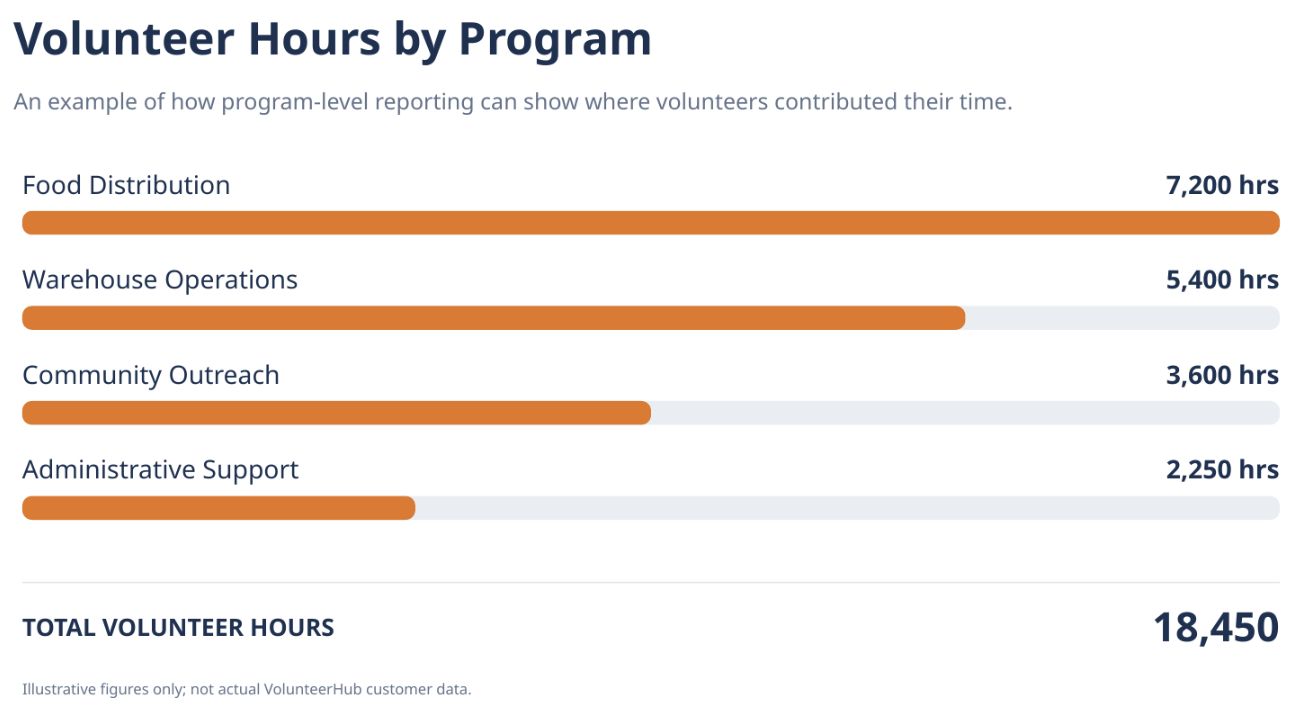
Break down your total volunteer hours by department, program, event, or service location so leadership can see which activities those hours supported. A food bank, for example, might report separate totals for warehouse operations, food distribution, mobile pantry events, and administrative support.
Review these totals alongside each program’s staffing needs and unfilled shifts. Fewer recorded hours do not necessarily indicate a volunteer shortage, but the comparison can help you identify where to investigate scheduling gaps, adjust recruitment, or plan additional support.
New and Returning Volunteers
Identify volunteers who participated for the first time during the year and those who returned after volunteering in a previous reporting period.
Make sure your organization establishes a consistent definition of a returning volunteer. For example, you might consider someone returning if they completed at least one shift in both the current and previous calendar years.
It is also useful to distinguish newly created volunteer accounts from people who actually completed their first shift. These are not necessarily the same population.
Understanding repeat participation can support ongoing efforts to improve volunteer retention.
Volunteer Opportunities and Shift Fulfillment
Review the number of volunteer opportunities offered during the year and the extent to which available positions were filled.
Consider measuring:
- Total volunteer shifts or positions available
- Number of positions filled
- Opportunities that were consistently understaffed
- Cancellations and no-shows, when tracked
A program that consistently struggles to fill certain shifts may need adjustments to scheduling, recruitment, or volunteer role descriptions.
Group and Corporate Volunteer Participation
If corporate teams and community groups participate in your volunteer program, show their contributions as a separate breakdown within your annual totals. Include the number of groups that served, individual participants, hours contributed, and projects supported, using the records available for your reporting period.
Keep group counts distinct from volunteer counts, and check for people who served both with a group and on their own. Their hours should reflect each completed shift, but each person should appear only once in your organization’s unduplicated volunteer count. A separate breakdown makes group contributions visible; it does not make them additional to the totals already reported.
Use this information to give partners a clear account of their participation and help your team plan future group shifts and projects.
Estimated Economic Value of Volunteer Time
Some nonprofits choose to include an estimated dollar value of the volunteer hours contributed during the year.
According to Independent Sector, the estimated national value of a volunteer hour in 2025 was $36.14, announced in April 2026 in partnership with the Do Good Institute at the University of Maryland.
Organizations can multiply their total volunteer hours by this estimate to calculate an approximate economic value.
For example, 10,000 volunteer hours multiplied by $36.14 equals an estimated $361,400 in contributed volunteer time.
This estimate can help communicate the scale of volunteer contributions, but it should not be presented as actual financial savings or treated as equivalent to program outcomes. Organizations should cite the source and the year of the estimate and consider using the appropriate state-specific figure.
For nonprofits interested in going beyond participation totals, How to Measure Volunteer Impact provides additional guidance.
Review Volunteer Data for Accuracy
Before sharing year-end results, take time to evaluate the quality and completeness of the information collected.
Start by confirming that volunteer hours, attendance records, and participation totals reflect the same reporting period. Review whether any duplicate records, incomplete check-ins, unapproved self-reported hours, or missing attendance information could affect your totals.
It is also important to document how each metric was calculated.
For example, your definition of an active volunteer might be an individual who completed at least one scheduled shift during the year. A returning volunteer might be someone who participated in both the current and previous reporting periods.
These definitions should remain consistent when comparing results over time.
You should also document known reporting limitations. If certain programs still use paper attendance records or have incomplete historical data, acknowledge those gaps rather than presenting the information as comprehensive.
Reliable data is particularly important when volunteer participation figures are used in grant applications, board reports, or organizational planning.
For more information, see Why Nonprofits Need to Track Volunteer Hours.
Include Outcomes, Not Just Volunteer Hours
Volunteer hours show how much time people contributed, but they do not explain what work was accomplished. A report showing 25,000 volunteer hours, for example, documents participation. Leadership and funders also need to understand which services those hours supported and what results your programs achieved.
Connect volunteer activity to documented program results wherever your records support the connection. A food bank might report households served through volunteer-supported distributions, a tutoring program might identify students receiving volunteer assistance, and an animal shelter might summarize adoption events volunteers helped staff. These figures describe services delivered and activities supported; they include measurable outcomes, such as changes in student performance, when you have evidence to report them.
Be clear about the volunteers’ role in each result. Distinguish work directly completed by volunteers from broader organizational accomplishments they helped support, and avoid attributing an entire program’s results to volunteer hours alone.
Include operational developments that shaped the year, such as new partnerships, expanded programs, revised onboarding procedures, or additional service locations. Explain what changed and how it affected volunteer coordination or service delivery, using the information available.
Document challenges with the same care. If attendance declined or certain shifts remained difficult to fill, identify the affected periods or roles and note what needs further review. Your year-end report should give your team a reliable basis for deciding what to maintain, what to adjust, and where to focus next year.
Example: A Year-End Volunteer Program Summary
Bring your core volunteer metrics together in a concise summary so leadership and funders can review participation, hours served, and group contributions without searching through detailed program records.
The following figures are hypothetical examples for illustration only.
| Volunteer metric | Example annual result |
|---|---|
| Unique active volunteers | 1,250 |
| Total volunteer hours | 18,450 |
| New volunteers | 420 |
| Returning volunteers from the previous year | 830 |
| Corporate and community groups | 38 |
| Total volunteer shifts completed | 4,125 |
| Estimated value of volunteer time | $666,783 |
In this hypothetical example, multiplying 18,450 volunteer hours by Independent Sector’s 2025 national estimate of $36.14 per hour gives an estimated in-kind value of $666,783. This figure communicates the economic value of contributed time, not actual financial savings or a measure of program outcomes.
Keep the summary focused on your core metrics, with reporting definitions, calculations, and supporting records available elsewhere in the report. If your volunteers serve across multiple programs or locations, add a chart showing how their hours were distributed so leadership can see which activities those totals supported.
Adapt Your Volunteer Report for Different Audiences
Your board, funders, and volunteers use year-end results for different purposes, so each audience needs a different level of detail. Preparing every version from scratch creates repeated work and increases the risk of inconsistent totals.
Build each summary from the same verified data, reporting dates, and metric definitions. Then select the figures and context each audience needs, keeping the underlying numbers consistent across board updates, funder reports, and volunteer communications.
| Audience | Recommended information |
|---|---|
| Volunteers | Total hours, program accomplishments, appreciation, and meaningful contributions |
| Executive leadership | Participation trends, volunteer hours, program performance, challenges, and opportunities |
| Board members | Key metrics, year-over-year comparisons, program outcomes, and resource considerations |
| Development staff | Volunteer participation, community involvement, outcomes, and statistics relevant to fundraising |
| Grant funders | Program-specific volunteer contributions, measurable results, and required reporting information |
For volunteers, keep the message focused on recognition and appreciation rather than administrative reporting. Sharing the organization's accomplishments can help individuals understand the significance of their contributions.
See How to Make Year-End Volunteer Recognition More Meaningful and Personal for additional ideas.
For executive leadership and board members, focus on information that supports planning, resource allocation, and program improvement.
Our post, How Smart Volunteer Data Turns Board Meetings Into Action, explores how nonprofits can make volunteer reporting more useful for organizational decision-making.
Year-End Volunteer Reporting Checklist
Use this checklist to confirm your participation totals, document reporting limitations, and prepare the results each audience needs before sharing your year-end volunteer report.
Volunteer Participation and Activity
- Establish the reporting period
- Calculate the total number of unique active volunteers
- Confirm total volunteer hours
- Break down hours by program, department, or location
- Identify new and returning volunteers
- Review volunteer opportunities and shift fulfillment
- Summarize corporate and community group participation
- Calculate the estimated value of volunteer time, if applicable
Data Accuracy and Documentation
- Verify reporting dates and volunteer activity records
- Review potential duplicate or incomplete records
- Document definitions used for each metric
- Identify missing information or reporting limitations
- Confirm consistency with previous reporting periods
Program Outcomes and Planning
- Highlight two or three measurable program outcomes
- Document significant changes or improvements
- Identify participation or scheduling challenges
- Include volunteer feedback or testimonials, with permission
- Establish priorities for the following year
Report Preparation and Distribution
- Prepare a complete internal report
- Develop a volunteer-facing summary
- Provide relevant statistics to leadership and development staff
- Complete any required funder reports
- Save reporting definitions and supporting data for future reference
How VolunteerHub Can Help With Reporting
When attendance and hours are recorded inconsistently throughout the year, preparing a year-end report means reconciling records before you can evaluate results. VolunteerHub’s standard and custom reports help you review volunteer activity, participation history, and hours served, using the records your team maintains.
Use the Registration Totals by User report to review participation and hours for a selected reporting period, including by Event Group. This gives you a starting point for organization-wide totals and a closer look at contributions across programs. Custom reports let you select relevant volunteer fields and filter participation records for specific groups or activities.
Choose report fields that match the question you need to answer. An account creation date tells you when someone registered, not when they first volunteered or whether they returned this year. Review account information alongside date-specific participation records when identifying new and returning volunteers.
Check whether each field reflects the selected reporting period or all-time activity. In the User Roster report, for example, all-time Hours and Event Count values should not be presented as annual totals without further filtering or validation.
Once you have confirmed the fields and filters, save your custom report configuration and document the definitions behind it. Reusing that setup can help your team maintain a consistent reporting approach, provided you review the dates and criteria for each reporting period.
Learn more about VolunteerHub's reporting and analytics capabilities.
Year-End Volunteer Reporting Should Become Part of Your Ongoing Process
Waiting until year-end to review volunteer records leaves less time to respond when attendance declines, shifts go unfilled, or reporting gaps emerge. Reviewing participation, hours, and documented program results throughout the year gives your team information to use while scheduling, recruitment, and engagement decisions are still being made.
Start this year’s report with the records you have. Confirm your reporting dates, verify your core metrics, and document any limitations. Then use what you find to establish a regular review schedule and address gaps in how attendance and hours are recorded.
The goal is not a more complicated report. It is a consistent reporting process that helps you explain volunteer contributions, support program decisions, and carry reliable information into the year ahead.