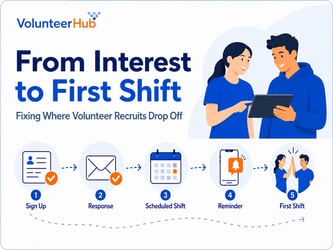

For volunteer coordinators, GivingTuesday can bring new registrations alongside an immediate operational challenge: having the shifts, onboarding capacity, and communication processes ready to support them. While fundraising receives much of the attention, the day also creates an opportunity to recruit volunteers for needs that extend well beyond a single day.
According to GivingTuesday’s official 2025 results, an estimated 38.1 million Americans participated, including approximately 11.1 million who volunteered their time. That interest matters, but registrations alone do not fill shifts. Your program needs a clear path from initial interest to completed service.
If prospective volunteers cannot find an available opportunity, understand registration requirements, or receive timely instructions, they may never reach their first shift. Preparing those steps in advance helps you address potential barriers before new registrations add to your team’s workload.
With GivingTuesday 2026 taking place on December 1, now is the time to review where you need volunteers and what your team can support. Start with available shifts, registration, and onboarding requirements, and the communication volunteers need to arrive prepared.
Review Your Volunteer Capacity Before Promoting Opportunities
Before promoting GivingTuesday volunteer opportunities, confirm where your program needs additional support and how many participants your team can accommodate. Recruitment should reflect available shifts, onboarding requirements, and staff capacity—not simply a goal of increasing registrations.
A program that requires training, background checks, or specialized supervision may not be able to place new volunteers immediately. Even when roles have fewer prerequisites, limited shift openings or staff availability can restrict participation. Inviting more people than you can support creates additional follow-up work without necessarily filling a program need.
Start with the programs that have unfilled shifts or upcoming staffing needs. Review how many additional volunteers each can accommodate, what preparation those volunteers need, and who will train and supervise them. Use that information to determine which opportunities you are ready to promote.
For example, a food bank may have warehouse shifts to fill throughout December but no additional capacity on GivingTuesday itself. Directing interested volunteers to those existing shifts connects recruitment to work that needs to be completed, rather than adding a one-day opportunity that requires separate staffing and coordination.
Recruit volunteers for work your program needs and your team has the capacity to support. Each opportunity you promote should connect a defined need with an available shift and the training, supervision, and instructions volunteers need to participate.
Make Volunteer Opportunities Easy to Find and Understand
If prospective volunteers cannot find an appropriate shift or understand what a role requires, your GivingTuesday outreach may generate questions rather than completed registrations. Give your volunteer registration experience the same attention as your donation page, with a clear path from campaign messages to available opportunities.
Before promoting those opportunities, review each listing for accuracy and completeness. Volunteers should be able to identify their responsibilities, the location, the shift date and time, the expected time commitment, and any prerequisites without contacting your team for basic details. Make orientation, training, and background check requirements clear before someone begins registering.
If your program offers multiple roles or locations, organize opportunities so people can find work that matches their interests and availability. Clear role descriptions and visible shift details give prospective volunteers the information they need to choose an appropriate opportunity.
Review the registration process from the perspective of someone new to your organization. Confirm that they can find an available shift, understand the requirements, and follow the instructions to register. Address unclear steps before GivingTuesday, so your team is not answering the same questions as new registrations arrive.
For additional guidance, see How Clear Volunteer Role Descriptions Reduce No-Shows.
Prepare for New Volunteer Registration and Onboarding
New volunteer registrations can expose gaps in your onboarding capacity before anyone arrives for a shift. People recruited through GivingTuesday may still need to complete forms, acknowledge waivers, attend orientation, or undergo background screening. If those steps are unclear or unavailable, interested volunteers may be unable to begin serving, leaving your team to resolve questions and delays individually.
Review the full onboarding process before your campaign begins. Confirm which requirements apply to each role, who reviews submitted information, and what must be completed before a volunteer can participate. If orientation is required, check that scheduled sessions have room for new participants. For roles that require background screening, explain what volunteers must submit and any processing time they need to allow.
Make the distinction between registration and approval explicit. After submitting their information, volunteers should know whether they can register for a shift immediately or must complete additional steps first. Explain how they will receive next-step instructions and confirmation that they are approved to participate.
A defined onboarding process gives new volunteers a clear route to their first shift. It also helps your team identify incomplete requirements before a scheduled shift, rather than addressing them when volunteers arrive.
For more information, read Volunteer Onboarding: How to Build a Process That Improves Retention.
Plan for Volunteer Interest Beyond December 1
When every GivingTuesday shift is full, interested volunteers need another clear option. Limiting recruitment to December 1 can leave future shifts unfilled while turning away people who are ready to participate. Build your campaign around upcoming program needs, not just the opportunities available that day.
Review your schedule for December and the new year, particularly programs with seasonal demand or recurring staffing needs. A nonprofit might direct GivingTuesday supporters to December food distribution shifts, January community programs, or ongoing volunteer roles. Offering several dates also gives people who cannot serve on December 1 a practical way to get involved.
Promote only the opportunities your team is prepared to support. Confirm shift availability, onboarding requirements, and supervision before inviting registrations. Future opportunities need the same capacity planning as those scheduled for GivingTuesday.
If a role is full, direct prospective volunteers to another available shift or explain when to check for additional dates. If future availability is not yet confirmed, say so rather than implying that a placement is guaranteed. A specific next step gives interested volunteers a way to stay involved while keeping expectations aligned with your program’s capacity.
Prepare Your Volunteer Communication Process
When each new registration requires a separate confirmation, reminder, and set of arrival instructions, volunteer recruitment adds communication work to your team’s schedule. Prepare those messages before GivingTuesday so volunteers receive consistent information, and your coordinators are not recreating the same instructions for every shift.
Confirm what volunteers will receive after registering and before they arrive. Include their shift date and time, the location and check-in instructions, required clothing or equipment, and any preparation they need to complete. Make it clear who to contact with questions or if they can no longer attend.
Plan for changes as well as confirmations. Decide who will notify affected volunteers about cancellations, schedule changes, or revised instructions, and which communication channels your team will use. Keep those messages aligned with current shift details so volunteers are not working from outdated information.
Where your volunteer management software supports automated confirmations and reminders, review the message content and timing before registrations increase. Clear instructions and timely reminders help volunteers understand their commitments, while a defined communication process limits the repeated follow-up your team needs to manage.
Evaluate Participation, Not Just Volunteer Interest
A GivingTuesday campaign can generate new registrations without filling the shifts your program needs. Evaluate what happens after people register: whether they choose an opportunity, complete their first shift, and return to serve again. Those steps distinguish initial interest from participation that your team can document.
Track the new volunteers who joined during your campaign period across these measures:
-
How many individuals joined your program during the campaign?
-
How many of those new volunteers registered for at least one opportunity?
-
How many shifts did those volunteers complete, and how many individuals participated?
-
How much service time did those volunteers contribute?
-
How many completed another shift in the following weeks or months?
Each measure answers a different operational question. Registrations show interest, while completed shifts and recorded hours show service delivered. Return participation helps you assess whether recruitment is building an ongoing volunteer base rather than requiring your team to recruit and onboard a new group for every need.
Set a review period that reflects the opportunities you promoted. If new volunteers registered for shifts scheduled weeks after GivingTuesday, an immediate report will not capture their full participation. Record initial results, then revisit attendance, hours, and return participation after those shifts have taken place.
Use gaps between these measures to guide your review. Volunteers who register but never select a shift may need clearer opportunity information or different scheduling options. Those who select a shift but do not attend may warrant a closer look at onboarding, reminders, or arrival instructions. Treat the numbers as a starting point for investigating where participation stalls, not as proof of a single cause.
How VolunteerHub Can Help Organizations Prepare
When registration, scheduling, communication, and attendance records are managed separately, each new volunteer can add another round of updates and follow-up. VolunteerHub brings these responsibilities into one volunteer management system, helping your team coordinate the steps from initial registration to recorded service hours.
You can publish volunteer opportunities, collect relevant information through customizable registration forms, and let volunteers register for available shifts through self-service scheduling. Coordinators can manage participation across programs while volunteers have a direct way to find and select opportunities.
Before each shift, automated email and text reminders help communicate schedules and preparation instructions without requiring your team to contact every volunteer individually. Check-in and hour-tracking tools support participation records you can use to review who attended and how much service time they contributed.
After GivingTuesday, reporting tools help you evaluate attendance and volunteer hours, then review participation history to inform follow-up about future opportunities. Keeping these records together gives your team a clearer basis for assessing recruitment results and planning ongoing volunteer involvement.
Make GivingTuesday an Opportunity for Lasting Volunteer Engagement
GivingTuesday recruitment is most useful when it fills real program needs and gives new volunteers a clear route to continued participation. More registrations are only the starting point. Your team needs available shifts, workable onboarding requirements, and timely communication to help those volunteers begin serving.
Before December 1, review the path from registration to a completed shift. Confirm that each opportunity has the capacity to welcome new participants, that volunteers understand their next steps, and that your team can track attendance and contributed hours. Include future shifts in that review so participation does not depend on availability on a single day.
Measure success by the number of service volunteers who complete and whether they return. Preparing for that ongoing involvement helps your program turn GivingTuesday interest into dependable support for the work your organization needs to deliver throughout the year.