


A volunteer newsletter can do more than fill inbox space. When it is structured well, it gives your volunteers a clear place to find upcoming shifts, program updates, recognition, and the information they need to stay connected to your mission.
What makes newsletters harder is not usually a lack of content. It is deciding what belongs in the message and what does not.
When a newsletter tries to include every update, recap, announcement, and request, the most useful details can get buried. Your volunteers should not have to sort through a long message to figure out what applies to them or what they should do next.
The strongest volunteer newsletters are not the longest. They are clear, focused, and useful. They help volunteers quickly understand what is happening, see the impact of their time, and take the next step with confidence.
Write for the Volunteer With Limited Time
When you plan your newsletter, write for the volunteer who is not closely connected to your day-to-day updates.
Your most active volunteers may already hear from staff, follow your social channels, or check your calendar regularly. The occasional volunteer is different. They are more likely to rely on your newsletter for updates, and they may only give it a minute or two of attention.
That volunteer does not need a full recap of everything happening across your organization. They need a few clear answers right away: What shifts are coming up? What difference did volunteers make? Is there anything I need to know or do next?
Keeping those questions in view helps you create a newsletter that feels useful instead of crowded. It also matters in a busy inbox. According to M+R Benchmarks 2026, nonprofits sent an average of 50 email messages per subscriber in 2025. That number includes more than volunteer communication, but it is a useful reminder that your newsletter has to earn attention quickly.
Every newsletter should give volunteers a clear reason to open it. For additional ideas on staying connected throughout the volunteer experience, explore our guide to improving volunteer retention through better communication.
Lead With Upcoming Volunteer Opportunities
The most useful information should show up early in your newsletter.
Lead with two or three upcoming shifts, events, or roles that still need support. For each one, include the date, a short description, and a direct registration link.
You do not need to include your full volunteer calendar here. Volunteers can visit your website if they want to browse every available opportunity. In the newsletter, focus on the shifts that are coming up soon or need the most attention.
Specific language also makes these opportunities more effective. Instead of saying, “Volunteers are needed for our September food sort,” say something more concrete:
We still need six volunteers for our September 12 food sort.
That kind of detail helps volunteers understand the need right away and see how their registration would make a difference. A specific request usually feels more relevant and more actionable than a general invitation.
Each opportunity should also link directly to the correct registration page. Do not send volunteers to your homepage and expect them to look for the event on their own. The fewer steps it takes to sign up, the more likely they are to follow through.
Clear opportunities, simple registration, and reliable follow-up are all part of creating a positive volunteer experience. Learn more in our article on how to schedule volunteers effectively.
Show Volunteers What Their Time Accomplished
After you show volunteers what is coming up, show them what their time has already made possible.
Choose one meaningful result from the time since your last newsletter. That might be meals packed, students supported, families served, calls answered, animals cared for, homes repaired, or total volunteer hours.
The strongest impact statements connect volunteer participation to a clear mission outcome. For example:
Volunteers contributed 640 hours in June, helping the pantry serve 210 more families than the previous month.
That kind of connection matters. It reminds volunteers that their time is not just filling a shift. Their participation is helping your organization serve more people, expand a program, or move its mission forward.
Independent Sector and the Do Good Institute estimated the national value of a volunteer hour at $36.14 in 2025, a 3.9% increase from the previous year.
That figure can add useful context to your volunteer data. In this example, 640 volunteer hours would represent more than $23,000 in estimated value. Still, the dollar amount should support the mission outcome, not replace it. Many volunteers will connect more directly with families served, students supported, or projects completed than with a financial estimate alone.
You may have several metrics worth sharing, but too many numbers can dilute the message. One meaningful result, clearly explained, is usually more memorable than a full paragraph of statistics.
For a closer look at choosing meaningful metrics and connecting participation to outcomes, read our practical guide to measuring volunteer impact.
Include a Brief Volunteer Spotlight
A volunteer spotlight adds a personal element to your newsletter while giving someone meaningful recognition.
The spotlight does not need to be a long profile. A few sentences about who the volunteer is, how they support the organization, and something meaningful they recently contributed may be enough. When possible, include a short quote in the volunteer’s own words, and always ask permission before featuring their name or photo.
Volunteer spotlights serve more than one purpose. They recognize the person being featured, but they also help other readers see what participation looks like at your organization.
Someone new or who volunteers less frequently may see a person with a similar experience and feel more comfortable taking another step. The spotlight can quietly communicate that there are many ways to contribute and that volunteers do not need to give dozens of hours each month to be valued.
Try to feature volunteers with different roles, experiences, and levels of involvement. Recognition should not be reserved only for the people who serve every week. Highlighting someone who made an important contribution during a single event reinforces that every volunteer’s time matters.
Our article on meaningful volunteer recognition ideas includes additional ways to make appreciation a consistent part of your program.
Share One Important Program Update
Your newsletter is also a good place to communicate changes that directly affect how volunteers participate.
This might include a new parking location, an updated check-in process, a policy change, a staff transition, a change in building access, or an adjustment to an upcoming event.
Keep the explanation clear and brief. Tell volunteers what is changing, when it takes effect, and what they need to do differently. If the update requires a longer explanation, provide the key information in the newsletter and link to a page with additional details.
These updates may not be the most exciting part of your newsletter, but they are often among the most useful. Clear communication helps volunteers arrive prepared and reduces the frustration that can come from being surprised on site.
It also builds trust. When volunteers know your organization will communicate important changes in advance, they have a practical reason to continue opening your messages.
If there is nothing important to share, you do not need to force an update into every issue. Leaving out unnecessary content can make the rest of your newsletter easier to read.
Close With One Clear Next Step
Near the end of your newsletter, give volunteers one clear action to take beyond signing up for a shift.
That action might be completing a short survey, sharing an opportunity with a friend, updating a volunteer profile, attending an upcoming open house, or following your organization on social media.
The important part is choosing one primary request.
When a newsletter includes too many calls to action, each one competes for attention. One clear next step is easier to understand and easier to complete, especially for volunteers reading on a phone.
That next step should also be easy to act on. Instead of saying, “Let us know what you think,” link directly to a short survey. Instead of asking volunteers to help spread the word in a general way, link to a specific opportunity they can share.
Fundraising requests should usually stay separate from routine volunteer communication. Your volunteers are already making a meaningful contribution through their time. Keeping the newsletter focused on their experience reinforces that their service is valued.
There may be times when it makes sense to share a fundraising request with volunteers, but that should be a deliberate choice rather than a standard part of every newsletter.
Be Selective About What You Include
A stronger volunteer newsletter usually comes from removing what does not need to be there.
A message from leadership may still belong in the newsletter if it gives volunteers information they need to know. If it does not directly affect their experience, a shorter update or a separate email may be a better fit.
The same applies to event recaps. You do not need several paragraphs to revisit something volunteers may have already attended. In many cases, a strong photo, one impact statement, or a brief volunteer spotlight will do the job more effectively.
General sector news, third-party articles, inspirational quotes, and updates that are not tied directly to the volunteer experience can create the same problem. Those items may have value elsewhere, but they can distract from the information volunteers are most likely to use.
Before you add something to the newsletter, ask a simple question:
Will a volunteer do, understand, or prepare for something differently because this information is here?
If the answer is no, that content may belong somewhere else.
Keep the Schedule and Format Consistent
For many organizations, a monthly newsletter provides a practical balance. It is frequent enough to keep volunteers informed without creating unnecessary work for staff or overwhelming readers.
Programs with frequent events or seasonal changes may benefit from communicating more often. Smaller programs may find that a newsletter every other month is enough. The right cadence depends on how often you have information that is genuinely useful to share.
Whatever schedule you choose, consistency matters. Volunteers should have a general sense of when they can expect to hear from your organization.
When urgent information comes up between newsletters, send a separate, focused message rather than waiting for the next issue or adding unrelated details to it. Your newsletter can provide a steady communication rhythm, while time-sensitive announcements can stand on their own.
Aim for a newsletter that can be read in about two minutes. Short paragraphs, descriptive headings, direct links, and enough white space will make it easier to review on a phone.
It is also important to recognize that volunteers may have different communication preferences. Email may work well for one group, while others may respond more quickly to text messages or other channels. Our article on communicating with volunteers across generations explores how different audiences may engage with your messages.
Use a Subject Line That Communicates Value
Your subject line should make it clear why the newsletter is worth opening.
A subject line like “Six Volunteer Spots Open for September 12” is more useful than “September Volunteer Newsletter.” One point to a specific need. The other only names the email.
In most cases, the strongest subject lines lead with the most timely opportunity, the clearest impact result, or the most important update. For example:
-
See What Volunteers Accomplished This Month
-
New Check-In Process Begins August 1
-
Three Ways to Volunteer This September
Each issue should give volunteers a fresh reason to open it. If the content changes, the subject line should change with it.
Your subject line should also match what is actually inside the newsletter. It can be specific and engaging without overstating the message or creating urgency that is not real.
Over time, test different approaches and see what holds up with your audience. Subject lines tied to upcoming shifts may perform differently from those focused on volunteer impact or program updates. Your own results will give you a more useful direction than any general benchmark.
Make the Newsletter Relevant to the Reader
Not every volunteer needs every update.
Someone who supports one location may not need information about a scheduling change at another. A volunteer involved in youth programming may not need operational details from a different department. Sending too much unrelated information can make volunteers less likely to pay attention when a message does apply to them.
Segmenting your communication can help each email feel more relevant.
Higher Logic’s 2025–2026 Association Email Benchmark Report analyzed more than two billion emails sent in 2025 by approximately 1,500 associations and nonprofits. The report emphasizes the importance of relevance, segmentation, personalization, and intentional targeting in email communication.
You might organize volunteers by location, program, interest, qualification, role, or participation history. Your general newsletter can still reach the full volunteer community, while more specific opportunities and updates are sent only to the groups they affect.
VolunteerHub allows organizations to create user groups based on programs, interests, locations, qualifications, training requirements, and other relevant criteria. Coordinators can then send individual or mass emails to the volunteers most affected by a particular opportunity or update.
Segmentation is not about sending more emails. It is about making each message more useful to the person receiving it.
Make the Newsletter Layout Repeatable
Your newsletter should also be realistic for the person creating it.
Volunteer coordinators already manage recruitment, scheduling, onboarding, communication, reporting, recognition, and the day-to-day issues that come with running a volunteer program. If your newsletter takes hours to write and design every month, it may be difficult to sustain.
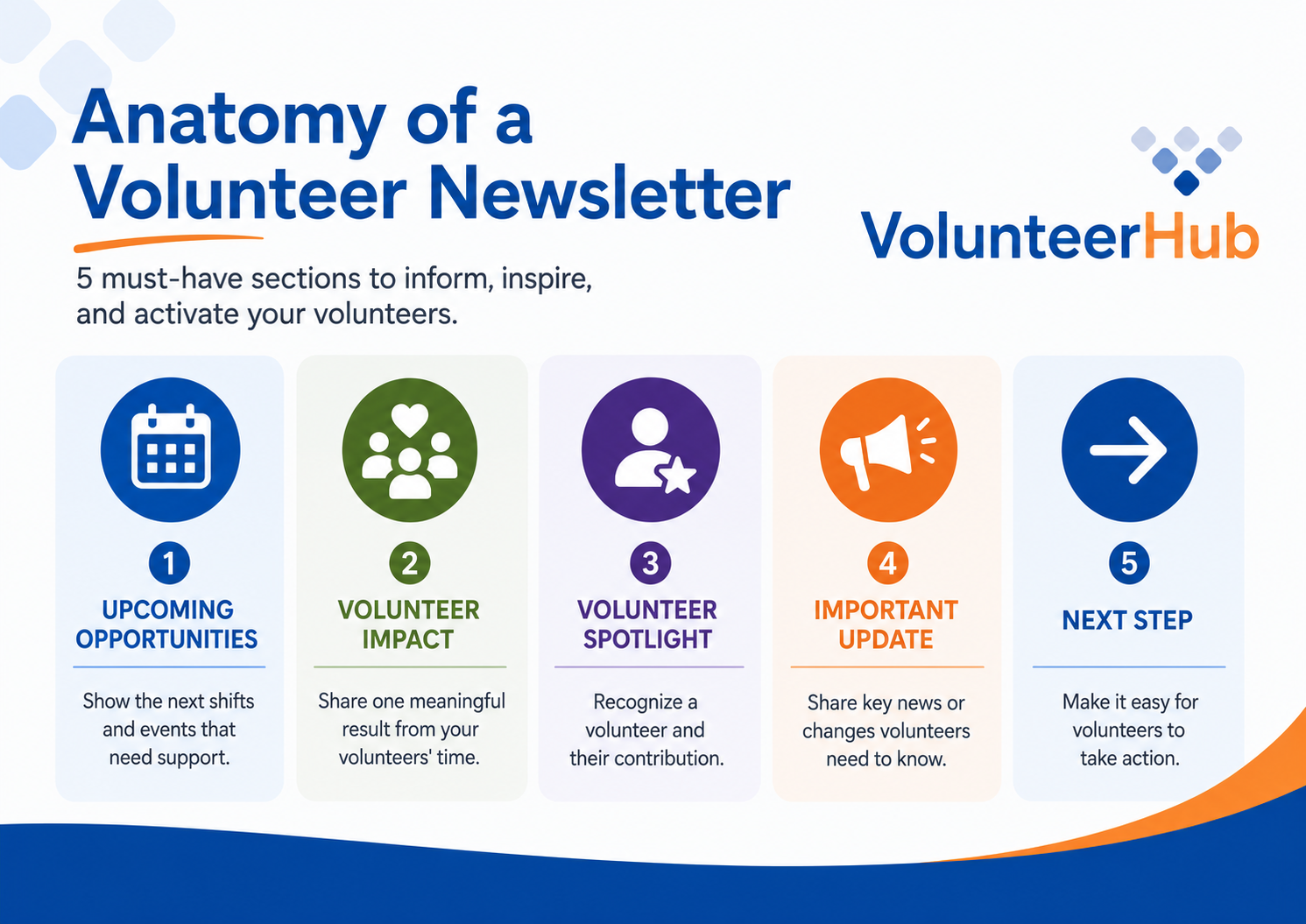
A simple, repeatable structure makes that work easier. Each issue can include a few upcoming opportunities, one meaningful impact result, a brief volunteer spotlight, any important program update, and one clear next step.
You can also gather much of that content as the month goes on instead of trying to pull it together at the last minute. Keep a running list of possible spotlights, program results, photos, and updates. When it is time to build the next issue, you will already have material ready to use.
Your newsletter does not need a completely new format every month. A familiar layout helps volunteers find what they need quickly, and it saves your team time in the process.
Start With Your Next Volunteer Newsletter
You do not need to rebuild your newsletter or rethink your entire communication strategy to improve it.
Start with your next issue. Lead with a few upcoming opportunities, share one meaningful impact result, feature one volunteer, communicate one important update, and close with one clear next step.
Then pay attention to how volunteers respond over the next few issues. Open rates can help you see whether your subject lines are earning attention, while clicks and completed registrations give you a clearer view of whether volunteers are taking action.
You may find that certain subject lines perform better, that some opportunities generate more response, or that a shorter format holds up better with your audience. Use those patterns to keep improving instead of expecting the first revised issue to be perfect.
A strong volunteer newsletter does not need to cover everything happening across your organization. It needs to help volunteers stay informed, understand the value of their time, and stay connected to the work they make possible.